


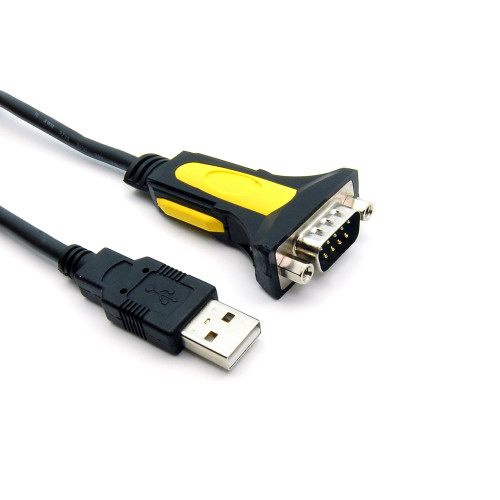
USB to RS232 Serial Adapter – DB9 Male, Hex Nut, Prolific Chipset
Connect a modern USB-equipped computer to legacy RS232 serial devices with this USB-to-DB9 male serial adapter.
The Industrial Netware USB to RS232 Serial Adapter provides a convenient way to add an RS232 serial communication port to a computer equipped with a standard USB Type-A port.
Designed for industrial equipment maintenance, serial device configuration, and legacy hardware connectivity, this adapter features a Prolific USB-to-serial chipset and a DB9 male connector with hex nut fasteners.
The approximately 70-inch cable provides flexibility when connecting laptops and desktop computers to equipment with RS232 serial interfaces.
Features and Benefits
-
USB to RS232 conversion: Adds an RS232 serial interface to a USB-equipped computer.
-
DB9 male connector: Features hex nut fasteners for compatible serial cable connections.
-
Prolific chipset: Provides USB-to-serial communication functionality.
-
USB 2.0 and 1.1 compatible: Supports standard USB Type-A host connections.
-
Data rates up to 1 Mbps: Supports a range of serial communication applications.
-
USB bus-powered: No external power supply required.
-
Approximately 70-inch cable: Offers flexible equipment connections.
-
Full-duplex asynchronous communication: Supports serial data transmission and reception.
-
Remote wake-up and power management support.
-
RoHS compliant.
Technical Specifications
| Specification | Details |
|---|---|
| Computer Connection | USB Type-A |
| Serial Connection | DB9 Male |
| Serial Interface | RS232 |
| DB9 Hardware | Hex Nuts |
| Chipset Manufacturer | Prolific |
| USB Compatibility | USB 1.1 / 2.0 |
| Maximum Advertised Data Rate | Up to 1 Mbps |
| Cable Length | Approximately 70 inches (5.8 ft) |
| Power Source | USB Bus-Powered |
| Communication | Full-Duplex Asynchronous |
| Compliance | RoHS |
| SKU | IN-22001 |
Operating System Compatibility
Manufacturer-listed operating systems include Windows 2000, XP, Vista, 7, 8, 10, and 11, Windows Server 2008, Linux, and legacy Mac OS versions.
Driver installation may be required. Compatibility depends on the operating system, installed driver, and chipset revision.
Typical Applications
-
Industrial RS232 equipment configuration
-
Serial console and maintenance connections
-
Legacy automation and control equipment
-
Modems and other serial peripherals
-
Test and measurement instruments
-
Equipment diagnostics and troubleshooting
-
Computers without built-in RS232 ports
Installation Notes
Connect the USB Type-A plug to an available computer USB port. Install the appropriate Prolific USB-to-serial driver if required.
After installation, identify the assigned COM port in your operating system and select that port in your serial communication software.
Connect the DB9 male connector to a compatible RS232 device or serial cable. Verify the required cable wiring and serial communication settings before use.
Important: This adapter supports RS232 serial communications. It is not an RS422 or RS485 converter. A compatible driver and correct equipment wiring may be required.


