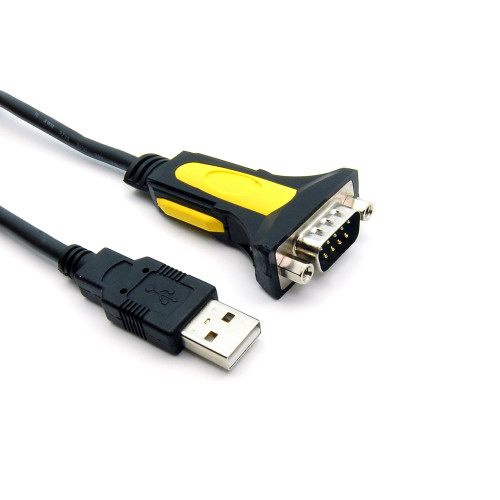


USB to RS232 DB9 Male Serial Adapter – Prolific PL2303GT, Thumbscrew, 70 Inch
Connect USB-equipped computers to legacy RS232 serial devices with this 70-inch USB-to-DB9 male serial adapter featuring a Prolific chipset and convenient thumbscrew fasteners.
The Industrial Netware USB to RS232 Serial Adapter provides a practical way to add RS232 serial communication capability to a laptop or desktop computer equipped with a standard USB Type-A port.
Designed for industrial equipment configuration, legacy serial device connectivity, and maintenance applications, this adapter features a Prolific PL2303GT USB-to-serial chipset, a DB9 male connector, and thumbscrew fasteners for securing compatible serial connections.
The approximately 70-inch (1.8-meter) cable offers flexibility when connecting computers to equipment with RS232 serial interfaces.
Features and Benefits
-
USB to RS232 conversion: Adds an RS232 serial communication interface to a USB-equipped computer.
-
DB9 male connector: Standard 9-pin serial connection for compatible RS232 equipment.
-
Thumbscrew fasteners: Allow the DB9 connector to be secured to compatible mating hardware.
-
Prolific PL2303GT chipset: USB-to-serial conversion chipset identified in the manufacturer's technical drawing.
-
USB 1.1 and 2.0 compatibility: Supports standard USB Type-A computer connections.
-
Data transfer rates up to 1 Mbps: Manufacturer-specified maximum serial data rate.
-
Full-duplex asynchronous communication: Supports simultaneous serial transmission and reception.
-
USB bus-powered: Requires no separate external power supply.
-
70-inch cable length: Approximately 1.8 meters for convenient equipment connections.
-
Remote wake-up and power management support.
-
RoHS compliant.
Technical Specifications
| Specification | Details |
|---|---|
| Product Type | USB to RS232 Serial Adapter |
| Computer Connector | USB Type-A Male |
| Serial Connector | DB9 Male, 9-Pin |
| DB9 Fasteners | Thumbscrews |
| Serial Interface | RS232 |
| Chipset Manufacturer | Prolific |
| Chipset Model | PL2303GT |
| USB Standard | USB 1.1 / 2.0 |
| Maximum Advertised Data Rate | Up to 1 Mbps |
| Cable Length | 70 Inches (Approximately 1.8 m) |
| Cable Diameter | 5.0 ± 0.1 mm |
| Power Source | USB Bus-Powered |
| Communication Type | Full-Duplex Asynchronous |
| Color | Black Cable with Black/Yellow DB9 Housing |
| Compliance | RoHS |
| Industrial Netware SKU | IN-22002 |
Operating System Compatibility
The supplier lists support for Windows 2000, XP, Server 2008, Vista, Windows 7, 8, and 10, Linux, and legacy Mac OS versions.
Driver installation may be required. Actual compatibility depends on the operating system, chipset revision, and installed driver.
Windows 11 compatibility has not been independently verified for this specific adapter.
Typical Applications
-
Industrial RS232 equipment configuration
-
Legacy serial communication equipment
-
Industrial control and automation maintenance
-
Serial console connections
-
Test and measurement instruments
-
Modems and compatible serial peripherals
-
Equipment diagnostics and troubleshooting
-
Computers without built-in RS232 ports
Installation and Setup
-
Connect the USB Type-A plug to an available computer USB port.
-
Install the appropriate Prolific USB-to-serial driver if required.
-
Identify the assigned COM port in the operating system.
-
Connect the DB9 male connector to a compatible RS232 device or serial cable.
-
Select the assigned COM port and configure the required communication settings in your serial software.
-
Verify proper communication with the connected equipment.
Important: This adapter provides RS232 serial communication. It does not convert RS232 signals to RS422 or RS485. Confirm the connected equipment's interface type and wiring requirements before use.
Driver Information
A compatible Prolific USB-to-serial driver may be required depending on the operating system.
Use the appropriate driver for the installed chipset and operating system. Driver availability and operating system support may vary.
For industrial applications, verify the assigned COM port and required serial communication settings before connecting to production equipment.